Securing Firebase
This is how you secure your firebase app from unauthorized access and potential threats.

This is for all of you building products using firebase as its backend, building a saas app in itself is a huge challenge and once its out in the internet for the world to see, it becomes extremely important to secure it as much as possible, i will try to make this post as concise and precise as possible, let me know if anything doesn't make sense or seems wrong.
This post will cover most the things that you can do to protect your firebase app from most of the common attacks and help you deal with vulnerabilities that your app may be having, also do notice that some of these guidelines are specific to firebase, but a lot of these are generally applicable to any saas app that has a backend written in some language and deployed on some cloud platform.
Lets begin.
Set max instance
When you are just starting out and launched your saas app using firebase, one thing that you should be aware of is the pay-as-you-go model of firebase's blaze plan, in this plan, you get charged based on the consumption of resources like functions runtime, or the consumed bandwidth for hosting, now this seems like a good plan as you don't have to think about server scaling, but it comes with a huge risk of bill spiking in case of burst of traffic, now burst of traffic might be a good thing for you, but this traffic also comes from millions of VPS servers just trying to take any server down through a DDOS attack, and if it ever hits your app with pay-as-you-go model of pricing, your pricing can spike like crazy, so it is always a good decision to set the max instances to 1 or 2 when you are just starting out.
You can set the max instances through two ways, one is through your functions config and second through the firebase dashboard.
- This is how you do it from your code
- And you can find the option to set the max instances from dashboard as well
- Head over to Google Cloud Console
- Select your function
- You will find the header containing Scaling options with min and max values
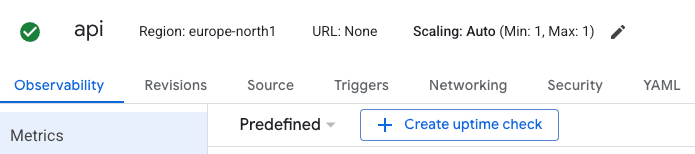
And for your internal api endpoints for your admin dashboards, always set the min instances to 0 and max to 1, setting min instances to 0 will save you a lot of money in the long run.
Configure domains
Although having a domain is not required to build and launch a saas product, but having a domain will help you a many ways, and you can always find a cheap domain name to begin with.
Once you have a domain, make sure to do this —
- Head over to Google Cloud Console
- Select your function
- Go to Networking tab
- Add you domain under the Custom domains manage button
- Once you add a custom domain, it takes a few hours for it to become active, and once its active, you can just use this domain for your api calls instead of using firebase's subdomain
- Once your custom domain is setup, make sure to uncheck the Enable checkbox, this will disable all the google's sub domains that point to your firebase functions.
Once you have added a custom domain, you have now infinite possibility to control the traffic to you app, you can add custom rules to allow or block certain kind of traffic(more on this later).
Integrate Cloudflare to sit in front of your domain
I am not sure how a service like cloudflare is free in this time, but while it is, lets try to use it as much as possible, also i will try my best to document things that are free and doesn't charge you upfront while you are starting.
Cloudflare is a proxy, that sits in front of your domain and traffic that comes to your domain must pass through cloudflare first, think of it as a gatekeeper, and you can configure it to allow or block certain kind of traffic.
I won't go in details about how to setup cloudflare, as there are tons of tutorials out there, here is one by the cloudflare team — DNS Setup
Block cloud service providers
The DDOS attacks are growing at an crazy rate, with the 71% of global bot traffic coming from united states alone using either AWS or GCP, and it is a no brainer at this point to block as much unwanted traffic as possible.
Unless you are hit by a botnet attack(there isn't much that you can do if it happens), It will be best to block all the traffic coming from virtual servers(VPS), virtual servers are not actual users browsing for your services, but they run code which is intentionally written to sabotage the targeted servers.
IMPORTANT: Traffic coming from VPS is not always bad, and you need to be extra careful when blocking traffic from virtual servers, as this may break critical integrations like Stripe, GoogleBot etc.
To block traffic coming from VPS, we need to know the IP addresses or ASNs(Autonomous System Number) of all those places which can send traffic to your servers in order to block them.
Here is a list of ASNs of the major cloud service providers globally.